Top 6 Laptop Docking Stations in the USA - Best Picks for 2026
Published on Tuesday, January 27, 2026
Laptop docking stations have become essential accessories for hybrid workers, creative professionals, and anyone who needs a productive, clutter-free workstation. In the USA market for 2026, docking stations are valued for their single-cable convenience, high-speed data links (USB-C and Thunderbolt), multi-monitor support, integrated Ethernet, and high-wattage power delivery that lets laptops charge while connected. Consumers increasingly choose docks that offer cross-platform compatibility, compact designs for home and travel, future-proof video and data standards, and reliable brand support. Demand is driven by continued hybrid work models, the rise of thin-and-light laptops with fewer built-in ports, and the need for fast, secure connections for video calls, external storage, and peripherals. Shoppers typically prioritize compatibility with their laptop brand and operating system, port selection (HDMI, DisplayPort, USB-A, USB-C), power delivery rating, and the balance between price and long-term reliability.
Top Picks Summary
The Dell WD19TBS Thunderbolt Docking Station is a market-focused leader favored by enterprises for tight integration with Dell systems, dependable firmware updates, and enterprise-class power delivery and peripheral routing. It competes well against consumer-focused rivals by offering strong compatibility and support for corporate fleets, though it can be more costly and in some cases less universally plug-and-play than generic Thunderbolt docks for non-Dell laptops.

The HyperDrive GEN2 12-Port USB-C Hub stands out with its extensive connectivity options, combining USB-A, HDMI, Ethernet, and more into a compact device. With the ability to connect dual 4K displays, it’s an ideal hub for multitasking and enhancing work efficiency. Its superior build quality ensures it can withstand daily use in fast-paced environments. Plus, the sleek design pairs well with any laptop, making it a stylish and functional addition to your tech setup.

The Microsoft Surface Dock 2 enhances your Surface experience with its exceptional versatility and efficiency. This dock allows you to connect up to two 4K monitors, ensuring that your workspace is both spacious and organized. Its USB-C ports facilitate high-speed data transfers and charging, making it a perfect partner for your Surface device. With a sleek design that complements Microsoft’s signature style, it stands out in the docking station market.

The Corsair TBT200 Thunderbolt 4 Dock excels in its dedication to gamers and creative professionals alike, providing ultra-fast data speeds and powerful connectivity options. Designed to support high-resolution dual displays, it enhances your gaming and multimedia experiences significantly. The dock features a robust selection of ports, catering to various devices and peripherals, simplifying your workspace. With Corsair's reputation for performance, this dock stands out as an essential tool for any serious gamer or content creator.

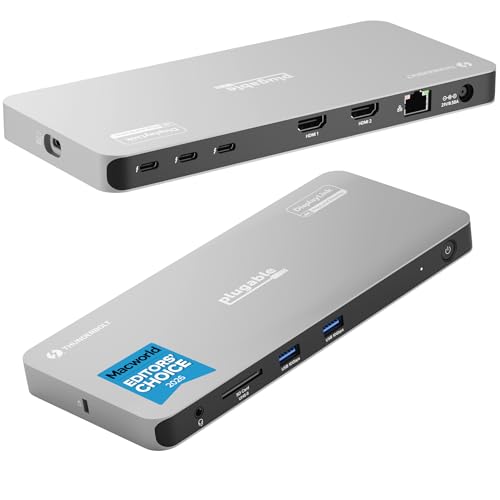
Plugable TBT4-UDZ Thunderbolt 4 Quad Display Docking Station
The Plugable TBT4-UDZ emphasizes high display capability and modern networking, often including multi‑gig (2.5 Gbps) Ethernet while delivering quad‑display support at a competitive price. It represents strong value for creators and multi-monitor professionals by matching or exceeding the technical networking features of pricier docks like CalDigit while generally undercutting them financially.
Kensington SD5780T Thunderbolt 4 Dual 4K Docking Station with 96W PD
The Kensington SD5780T Thunderbolt 4 Dual 4K Docking Station pairs Thunderbolt 4 bandwidth with 96W power delivery and dual‑4K display support, making it a strong choice for creative professionals who need reliable HDMI output and high charging capacity. It competes with Dell on performance and with Anker/UGREEN on real-world convenience, offering a balance of enterprise features and modern single-cable workflows without the top-tier price of some OEM enterprise docks. Kensington’s security and accessory ecosystem add extra value for business users looking to standardize on HDMI-capable docking.

Why docking stations matter - research-backed benefits
Multiple lines of human factors, ergonomics, and productivity research support the practical benefits of docking stations. These devices help reduce physical strain, streamline workflows, and maintain stable network and power connections. Below are clear, beginner-friendly points that summarize the evidence and practical implications for everyday users.
Improved productivity with multiple displays: Human factors and usability studies show that adding one or more external monitors can speed up task switching, reduce context switching costs, and make multitasking more efficient. Docking stations that support dual or triple displays help users complete complex tasks faster.
Better ergonomics and reduced discomfort: Ergonomics research links proper screen height and arrangement to lower neck and shoulder strain. Docking stations make it easy to connect to external monitors and keyboards, helping users set up healthier, more ergonomic workstations.
Simplified connectivity reduces friction: Studies in workplace efficiency note that reducing setup time and device swapping improves focus. Single-cable docking minimizes repetitive cable plugging and unplugging, saving time for hybrid workers and hot-desk environments.
Stable wired networking and video calls: Network and communications research indicates that wired Ethernet reduces packet loss and latency compared with Wi-Fi in many environments. Docking stations with Ethernet ports provide more reliable video conferencing and large file transfers.
Power delivery and battery management: Power electronics research supports the value of standardized power delivery (USB-PD). Modern docks supply stable charging to laptops while managing power distribution to peripherals, which helps maintain battery health and system stability when properly used.
Sustainability and lifecycle benefits: Product design and sustainability studies note that modular accessories can extend the useful life of laptops by adding ports and capabilities without replacing the main device, helping reduce electronic waste when consumers choose durable, repairable docks.
Frequently Asked Questions
Which dock should I buy for Dell laptop users?
Dell WD19TBS Thunderbolt Docking Station is a strong pick for Dell laptop owners because it’s built around native Dell firmware integration and compatibility with Dell laptops, with an average rating of 4.4.
Does CalDigit TS3 Plus support Thunderbolt 3 and 4K?
CalDigit TS3 Plus Thunderbolt 3 Dock includes Thunderbolt 3 support, plus multiple ports (USB-C, USB-A, and an SD card reader) and power delivery for charging laptops; it’s rated 4.8.
Is HyperDrive GEN2 12-Port USB-C Hub good for the price?
HyperDrive GEN2 12-Port USB-C Hub costs $100.00 USDand delivers a compact 12-port design with dual 4K display support, plus USB-A, HDMI, Ethernet, and compatibility with USB-C and Thunderbolt 3; it’s rated 4.3.
What display setup does Dell WD19TBS support per docking?
Dell WD19TBS Thunderbolt Docking Station supports single 4K@60Hz or dual 4K depending on the host and configuration, and it’s priced at $115.99 USDwith an average rating of 4.4.
Conclusion
Laptop docking stations are a practical, widely adopted solution in the USA for anyone who needs more ports, better displays, and a cleaner desk setup. We hope this guide helped you find the right dock among the top 6 picks for 2026. If you want to refine or expand your search, try filtering by compatibility, power delivery, number of displays, or port types using the search.