Best High Frame Rate USB Webcams 2026 — Top 7 USB Digital Camcorders in the USA

Published on Thursday, February 26, 2026

High-FPS USB webcam digital camcorders are revolutionizing how we capture video. With the ability to record at higher frame rates, these USB webcams render fast-paced action like gaming, live streaming, video conferencing, and sports commentary with far less motion blur and smoother motion. In the United States, where content creation, esports, and remote collaboration continue to grow, consumers prefer webcams that combine high frame rate performance, reliable USB connectivity, and easy software integration. Buyers increasingly value a mix of high temporal resolution (60 fps and above), solid low-light performance, accurate autofocus, and plug-and-play compatibility with popular streaming and conferencing software. Manufacturers are responding with devices that offer 1080p at 120 fps or higher, and 4K capture with improved frame rates when conditions and bandwidth allow. The result is clearer motion, more natural facial expressions during streams, and a more professional look with minimal setup.

Top Picks Summary

  1. Logitech Brio 4K Pro Webcam
  2. Elgato Facecam Pro
  3. Razer Kiyo Pro Ultra
  4. Dell UltraSharp Webcam WB7022
  5. Insta360 Link
  6. Logitech StreamCam
  7. AVerMedia PW515 4K Ultra HD Webcam
BEST VERSATILE 4K

Logitech Brio 4K Pro Webcam

Logitech

The Logitech Brio 4K Pro Webcam is a long-standing, reliable choice for high-frame-rate USB capture, balancing 4K imaging with stable 1080p/60 performance and broad OS and enterprise driver support. It holds its position by offering proven color science and corporate-friendly features at a price point that undercuts some niche creator-focused models, making it a solid all-around option compared with the more creator- or gamer-targeted cameras on this list.

4.6Rated 4.6 out of 5 stars
Logitech Brio 4K Pro Webcam

Review Summary

93%

"Users praise its consistently sharp 4K image, reliable performance, and effective HDR for bright/dark scenes; some note occasional software quirks but overall long-term stability."

Reviews from the web

40 quotes · 9 sources · 2021–2026
  • The quality of image that this webcam offers is superior to anything you’ll find on a typical laptop. But it isn’t perfect, and some conferencing tools don’t utilise some of its better features.

    2021
  • Unfortunately, the Brio's clip is a huge step down from those on previous models, and it doesn't hold the camera tight against displays. Moreover, the privacy clip is loose and left adhesive residue on our review unit.

  • Still, if you’re a forward-thinking type and can spend a bit more on this kind of peripheral, you’ll have few complaints about the Brio 4K Pro and its ability to capture your facial expressions in ultra-sharp detail.

  • Yes. If you would like a true 4K at a budget-friendly price, but you do not require modern AI feature capabilities.

  • The Right — Light 3 with HDR (High Dynamic Range) technology really shines in less-than-ideal lighting conditions. Whether you’re sitting in front of a window, under harsh fluorescent lighting, or in a dimly lit room, the camera intelligently balances brightness and contrast to...

    · 2025Recent
  • The Logitech Brio Webcam provides high-resolution image capture, perfect for detailed video conferencing or content creation. Its low-light performance characteristics guarantee clear footage even in dimly lit environments.

    2024
  • The build quality makes an immediate impression. At 11.8 ounces, the Brio feels substantial without being cumbersome. The matte black plastic housing resists fingerprints effectively, and the glass lens with its protective rim speaks to the quality components inside.

    2025Recent

Loved

11
  • Logitech also includes a drawstring carrying case in the box, which is a nice addition for travelers who are using the Brio on the go and don't want to jam it into a bag without protecting it.

    Laptop Mag
  • Beautiful 4K images with HDR

    Laptop Mag
  • Sharply detailed resolution with vibrant colors

    PCWorld
  • Wide-angle field of view

    PCWorld
  • The C1000e is a lozenge-shaped metal tube with a plastic facia where the lens is covered with a protective glass surface. It’s simple, elegant and feels precisely made to the touch.

    TechRadar
  • In terms of build quality, the Logitech Brio performs much better than other units priced similarly. It is physically larger/heavier than all of the competing cameras in the same price range and includes a soft carry case.

    digitalfilmmaker.net
  • One reviewer found that there is a recessed, quarter-twenty tripod thread underneath the removable clip attachment point.

    digitalfilmmaker.net
  • Yes. As a plug-and-play UVC webcam, the Brio functions on Mac as well as on Windows operating systems and may be utilized within Zoom, Teams, OBS, FaceTime and virtually all additional video conferencing and streaming applications.

    digitalfilmmaker.net
  • Reliable and high-performance webcam chosen by many professionals and content creators.

    Mini PC Reviewer
  • Exceptional video quality with 4K Ultra HD resolution and advanced features like HDR.

    Mini PC Reviewer
  • Low-light performance and infrared sensor capabilities for enhanced video quality.

    Mini PC Reviewer

Criticised

11
  • Privacy cover feels cheap and leaves residue behind

    Laptop Mag
  • Clip doesn't hold tightly to monitors and laptops

    Laptop Mag
  • 4K-ready apps and services are still scarce

    PCWorld
  • A 4.9-inch cable—USB-C at the camera end, USB-A on the other—is supplied with the camera, but the short distance from your laptop’s USB port to its monitor means you’ll have a tangle of slack to deal with.

    PCWorld
  • Conferencing tools that ignore 4K capability

    TechRadar
  • Weird method of connecting the clip

    TechRadar
  • The camera cover was an afterthought

    TechRadar
  • But conversely, it comes with an adjustable clip that that’s plastic and not as impressive as the camera that mounts on to it.

    TechRadar
  • The dual omnidirectional mics included with the Brio are acceptable for conferencing purposes, but they don't make anything special.

    digitalfilmmaker.net
  • Almost every reviewer has commented on the issue surrounding the software associated with their Logitech Brio unit. They described this problem as similar to saying "the camera itself is fantastic. however the app is horrible."

    digitalfilmmaker.net
  • What you give-up when choosing to use the original Brio model, is modern convenience features including AI auto-framing, Show mode, USB-C connectivity and access to a software application that appears to be antiquated.

    digitalfilmmaker.net

Buyer voices

11
  • Logitech BRIO 4K Quality? (self.obs)

    reddit
  • I tried my Logitech Brio 4K and my Insta360 Link. Both showed up as “Camera connected” and “Now using USB Mic,” but neither shows as connected when you test them. Anyone have any ideas?

  • Its literally the same as the Brio 4k 1st gen really, which is good but you NEED great lighting. If you want a camera that works with low light and gets the job done properly, yolocam S2. Worth the investment! Largest webcam sensor to date and by far the closest ever to DSLR.

  • I have a Logitech cam for Windows Hello. It works... I'd say it's 85% reliable whereas the built in one on the Surface is 95% reliable.

  • I just moved from a Logitech Brio 4k Stream Edition to the new Elgato 4k FaceCam. They both are great. Never had any problems.

  • I got the Brio with Windows Hello support a few months ago. Love it.

  • I have a Logitech Brio 4K plugged into the doc and it shows us on Mario Kart. I haven’t tried it with anything else, but it seems to work for me.

  • I have no clue why it does, just happy as it’s my only external webcam.

  • Very disappointed with this, i have two brio 4k the Apple branded one and the original and both don't work

  • My ⁠Logitech Brio 4K (model V-U0040) does not work. The Switch detect it as a camera, but it does not show up under the USB camera test and does not work in game chat.

  • Thank you for the instructions! I was able to successfully downgrade the firmware on my Logitech Brio 4K using Parallels on my MacBook.

BEST CREATOR HIGH-FPS

Elgato Facecam Pro

Elgato

The Elgato Facecam Pro focuses on creators and streamers who need low-latency, high-frame-rate performance and deep software control over image parameters, letting you tune exposure and color for motion-intensive content. Its creator-centric workflow and often competitive pricing against pro-grade webcams make it a strong alternative to enterprise-centric models like Dell's, while delivering a more polished streaming experience than many basic 4K webcams.

4.5Rated 4.5 out of 5 stars
Elgato Facecam Pro

Review Summary

91%

"Owners like its high-frame-rate performance, clean uncompressed output, and pro-style controls; a few report autofocus or exposure can be aggressive in complex lighting."

Reviews from the web

57 quotes · 11 sources · 2022–2026
  • Recording videos in 4K at 60fps is no problem for the Elgato Facecam Pro. Fit for any content creator or streamer’s setup, this webcam boasts excellent autofocus and face tracking to ensure you’re the main highlight in your videos, and its detailed companion software lets...

    2024
  • This outstanding plug-and-play device delivers stunning visual fidelity, robust camera controls courtesy of the impressive Elgato Camera Hub app, legitimate 4K 60fps output, and a webcam lens that’s actually worth celebrating.

    2023
  • Most people don’t need or want to capture 4K/60fps video, and most people don’t need this webcam. But it’s a great webcam.

    2022
  • That’s a good thing since its price of entry is more than what most of us are willing to pay – it’s hardly a cheap webcam. The Elgato Facecam Pro isn’t the ideal webcam for the majority of the population, but it’s certainly the best webcam for quite a few users.

    2022
  • Introducing the Facecam Pro (opens in a new tab), a $300 webcam from Elgato that promises to raise the bar of what a webcam is capable of.

    2026Recent
  • A plastic clip attaches to a mount with a rubberized, hinged jaw for setting the camera on top of your monitor. The mount lets the camera tilt up and down, as well as pivot left and right; it’s just stiff enough to keep the cable from pulling the camera out of alignment.

    · 2022
  • Elgato is a name synonymous with streaming and content creation. The company has released some unique products that have gone on to dominate the streaming world, and their latest webcam, the Facecam Pro, was the first in the world to support 4K 60fps capture.

    ·
  • The native 78-degree horizontal field of view frames a single person nicely at typical desk distances (24-36 inches from camera). Wide enough to capture upper-body gestures and some desk context, narrow enough to avoid the “fisheye” feel of ultra-wide models.

  • In terms of build quality, the Elgato Facecam Pro is solid. The monitor clamp is sturdy and secure, and the camera feels durable. There’s no indication of wear after several weeks of use, and everything feels well-constructed.

    2025Recent
  • These are essentially preset settings that adjust various image parameters such as color, contrast and much more. Five LUTs are already pre-installed and many more can be downloaded free of charge from the Elgato website. Perfect for creating your very own, individual look.

    2025Recent

Loved

28
  • What I really like about this webcam is that you can use Camera Hub to pan and tilt. This means you don’t need to worry if the webcam isn't pointing directly at you. Simply use the software to center yourself and you’re good to go.

    Tom
  • While it’s a plug-and-play webcam, you’ll need to download Elgato Camera Hub either on Mac or Windows to make the most of the Elgato Facecam Pro. The software lets you do everything you could possibly desire.

    Tom
  • Images and videos are super sharp thanks to the Elgato Facecam Pro’s 4K capabilities, but these images are just as sharp even when zoomed into.

    Tom
  • Great image quality even when zoomed into

    Tom
  • From great image quality and superb autofocus to the detailed companion software, the Elgato Facecam Pro will easily fit into a streamer’s or content creator’s setup.

    Tom
  • The Elgato Facecam Pro’s biggest selling point is its image quality. Equipped with Sony’s 1/1.8-inch Starvis CMOS sensor, the webcam allows for 4K at 60fps recording.

    Tom
  • In my testing, the webcam followed my head movements without a problem, as you can see in the video above. You can save this setting and it will carry over to whatever device you intend on using. Easy!

    Tom
  • Via Camera Hub, you can enable face tracking which does what it says on the tin: the Elgato Facecam Pro will track your head movements to ensure you’re always in frame.

    Tom
  • For example, in the screenshot above, the main subject is the Razer Pro Click Mini, and the Facecam Pro had no issues putting the focus on the mouse. Content creators who do product reviews where they hold the product up to the camera will find this feature really handy.

    Tom
  • The Elgato Facecam Pro’s autofocus capabilities are something to behold. The webcam does a great job of distinguishing subjects in the foreground from those in the background.

    Tom
  • When you’ve made all the adjustments, hit save to carry the settings over to whichever device you plug the Facecam Pro into. I made the adjustments on a Windows 11 laptop and then plugged it into my MacBook Air M2, and the quality was just as I wanted it to be.

    Tom
  • Excellent image quality and color depth

    Windows Central
  • Crisp and consistent 4K60 captures

    Windows Central
  • Robust camera control options

    Windows Central
  • The Facecam Pro performed pretty well in this setting, considering. It managed to light both the subject (me) and the background — unlike the Insta360 Link, which very dramatically left the background in darkness.

    Tom
  • I’m not a big fan of peripheral software in general, and I usually find webcam software particularly offensive. Elgato’s Camera Hub, however, is an exception — not only does it offer detailed control over things like exposure, focus, and white balance, it also has some handy...

    Tom
  • Camera Hub has several sections for adjusting the Facecam Pro’s image, including exposure, white balance, and picture, with more detailed controls in each section.

    Tom
  • Luckily, this was easy to fix with a few manual adjustments in Elgato’s Camera Hub software.

    Tom
  • Manual exposure via Camera Hub

    TechRadar
  • Snappy auto-focusing in well-lit conditions

    TechRadar
  • Wide dynamic range, great noise reduction

    TechRadar
  • There are two things that set the Elgato Facecam Pro apart from the sea of still amazing webcams on the planet: it’s got the largest sensor on a webcam, and it’s the first webcam to deliver 4K at 60fps videos.

    TechRadar
  • The Elgato Face — Cam Pro’s standout feature is its ability to capture in 4K60, which is a resolution of 3840×2160 and 60 frames per second.

    Gaming Careers
  • Under ideal lighting conditions, with a key and fill light, the Elgato Facecam Pro performs exceptionally well, producing much better skin tones and delivering sharpness and extra detail thanks to its 4K image capabilities.

    Gaming Careers
  • Even in low light conditions, the Elgato Facecam Pro manages to outperform the original Facecam, doing a decent job of balancing exposure and skin tones. This is especially impressive considering the dark room scenario, where only the monitors provided light for the test.

    Gaming Careers
  • One of the new features of the Elgato FaceCam Pro is autofocus, which was not included in the original FaceCam. Elgato made a big deal about not including autofocus in the original FaceCam, as it was believed to provide a better experience for streamers.

    Gaming Careers
  • Seamless elgato ecosystem integration

    redditrecs.com
  • High resolution and frame rate

    redditrecs.com

Criticised

16
  • The Facecam Pro isn’t without its faults though, as it struggles in low-light conditions, doesn’t have a built-in microphone and costs a lot.

    Tom
  • The Elgato Facecam Pro has some faults, including the lack of a built-in mic, problems in low-light conditions, and a lofty asking price.

    Tom
  • The Elgato Facecam Pro is relatively affordable compared to the average DSLR camera. Unfortunately, this device is notably pricey compared to most 4K USB webcams. The Elgato Facecam Pro is currently available through Elgato for a whopping $300.

    Windows Central
  • "Auto" settings are disappointing

    Windows Central
  • For the most part, the Facecam Pro works okay out of the box. But you don’t spend $300 on a webcam for “okay.”

    Tom
  • The Facecam Pro does not come with a physical privacy cover/shutter...but it should. No webcam, but especially no offensively high-def 4K webcam that streams at 60fps, should not come with a privacy cover.

    Tom
  • To test the Facecam Pro’s low-light performance, I turned off all of my lights and three of my monitors — leaving just one 27-inch monitor as a light source. The Facecam Pro did not perform very well in this scenario with default settings, and produced an extremely grainy image.

    Tom
  • Images need tweaking to look good

    Tom
  • At $299 / £299, the Elgato Facecam Pro’s price tag is certainly an eye-watering revelation, especially to budding content creators who don’t have the budget to make TikTok videos on such a pricey webcam.

    TechRadar
  • Pretty big for a webcam

    TechRadar
  • AF is slower in low light

    TechRadar
  • Definitely expensive for a webcam

    TechRadar
  • That said, it is still pretty expensive for many streamers and content creators, let alone most webcam users. So, we’re knocking a point and a half off the Elgato Facecam Pro’s value rating because of that.

    TechRadar
  • The first thing you’ll likely notice about the Elgato Facecam Pro is its size. At 4.6 x 1.5 x 3.1 inches, it is a sizable one – almost double the size of the Elgato Facecam – with what we assume are vents near the back to minimize overheating of its more powerful innards.

    TechRadar
  • In the challenging scenario where the window shutters were open and no lights were on, both the Elgato Facecam Pro and the original Facecam struggled to produce a good image, with overexposed light from outdoors and underexposed skin indoors.

    Gaming Careers
  • Lack of native recording software

    redditrecs.com

Buyer voices

3
  • Bad experience with Elgato Facecam Pro (after 6 months of use) - anyone else?Discussion (self.elgato)

  • Overall impressions of the FaceCam Pro after almost 2 weeks of use.Discussion (self.elgato)

    reddit
  • Is elgato facecam equivalent to the DSLR quality?Question (self.Twitch)

    reddit
BEST LOW-LIGHT HIGH-PERFORMANCE

Razer Kiyo Pro Ultra

Razer

The Razer Kiyo Pro Ultra targets gamers and prosumers who demand high-frame-rate capture combined with advanced imaging and ecosystem integration, prioritizing low-light sensitivity and customizable performance through Razer software. It commands a premium for those features and brand integration, offering more enthusiast-focused controls and aesthetics than the more business-oriented Dell or the streamlined, budget-conscious AVerMedia option.

4.3Rated 4.3 out of 5 stars
Razer Kiyo Pro Ultra

Review Summary

89%

"Reviewers appreciate excellent low-light HDR, fast frame rates, and advanced features (wide FOV, modular lighting), but mention the premium price and relatively bulky design."

Reviews from the web

38 quotes · 14 sources · 2023–2026
  • The Kiyo Pro Ultra is one of the best webcams we’ve ever seen... and Synapse 3 is one of the worst software programs we’ve ever seen.

    2023
  • Not all of us need a powerful webcam, but while the Razer Kiyo Pro Ultra best serves streamers and other content creators, other users, including office professionals, are going to want it on their desk too.

    2023
  • We’ve tested plenty of 4K webcams and the Kiyo Pro Ultra’s picture quality plainly stands out, particularly against the maximum 1080p resolution of the Kiyo Pro. I look incredibly sharp in well-lit test captures; individual hairs on my head and beard appear crisp and detailed.

    · 2023
  • In the time I've been testing this webcam, I've taken numerous camera-on meetings on Discord, Microsoft Teams, and Zoom. The image quality in every application is crystal clear and almost always elicits comments from my fellow meeting attendees.

    · 2024
  • Like most of Razer's PC products, the Kiyo Pro Ultra comes with a slew of software adjustments that can be made using the Razer Synapse app. A lot of people don't like Razer Synapse, but I find it to be fairly straightforward compared to peripheral software from other companies.

    · 2023
  • It seems expensive, and it certainly is compared to traditional webcams, but its pricing makes more sense when you consider that it sits in between what are usually pretty poor cameras and far more expensive options that may work as webcams, but are most certainly designed...

    · 2023
  • When it's good, the Kiyo Pro Ultra is great. It incorporates a 1/1.2-inch Sony Starvis 2 sensor, which is a just bit smaller than the 1-inch sensor in compact vlogging cameras like the Sony ZV-1 but loads bigger than the sensors in other webcams, with a good size f1.7 aperture.

    ·
  • All of the Razer Kiyo Pro Ultra’s controls are found within the Synapse Streaming tab at the very top: All of the options are generally well organized under Camera, though you’ll find the resolution and frame rate inexplicably tucked inside the Processing tab.

  • The great thing about the design of the Kiyo Pro Ultra is that it looks like a proper camera, rather than a webcam. It's got a lens-like design featuring a wide-angle, 8.3MP AF lens, with a wheel-like mechanism that activates the privacy shutter, which is a nice addition.

    2025Recent
  • The autofocus is fast and reliable, which matters when you're moving around during a stream or glancing away from camera. And that bokeh effect? It's beautiful. You get that nice background blur that makes you stand out, without needing ring lights or complicated lighting setups.

    · 2026Recent
  • The Razer Kiyo Pro Ultra 4K Webcam stands out for its exceptional image quality and advanced features tailored for gamers, streamers, and content creators. This webcam excels in image clarity and low light performance, setting it apart in the market. Here are some key pros:

    2024
  • The native 78-degree horizontal field of view frames a single person nicely at typical desk distances (24-36 inches from camera). Wide enough to capture upper-body gestures and some desk context, narrow enough to avoid the “fisheye” feel of ultra-wide models.

  • Sometimes it's tough to tell that a webcam's privacy shutter is closed if it has one at all. Not so with this Razer. When closed, the shutter's light gray teeth stand out clearly against the black webcam. I could spot whether the shutter was open or closed from across the room.

    · 2023

Loved

16
  • For those of you keeping track, this webcam has not one but two physically-operated privacy controls, while other impressive 4K webcams such as the Insta360 Link and the Elgato Facecam Pro have none. Also — closing the privacy shutter does not turn off the camera.

    Tom
  • The Kiyo Pro Ultra looks great with its default, out-of-the-box settings. It does an excellent job with auto-exposure and auto-color balance, even better than the Insta360 Link.

    Tom
  • The Kiyo Pro Ultra comes with a soft, rubbery physical lens cap, as well as an internal privacy shutter that’s cleverly designed to mimic an iris. Twisting the webcam’s outer ring to the left closes the privacy shutter, while twisting it to the right opens it.

    Tom
  • Great auto-exposure and white balance

    Tom
  • Ultra-high image quality with variable FPS options

    Pocket-lint
  • Great low-light performance and noise handling

    TechRadar
  • Wide dynamic range plus HDR

    TechRadar
  • Despite its intimidating size, the Razer Kiyo Pro Ultra is very easy to set up, being plug and play. It has a 1.5-meter braided cable that may be pretty thick but is manageable.

    TechRadar
  • And, while it comes with an unattached camera cover, something the Elgato Facecam Pro doesn’t even bother with, it throws in a built-in privacy shutter for good measure – in case you do lose that cover.

    TechRadar
  • Lens cap as well as a privacy shield

    PCWorld
  • 4K options, HDR too

    PCWorld
  • Stunning image quality, massive sensor, loads of customisation options

    Daily Mirror
  • Large 2.9 μM Pixel Size and F/1.7 Aperture Lens for superior image quality.

    Mini PC Reviewer
  • Ai-Powered Face Tracking and Background Blur for professional video communication.

    Mini PC Reviewer
  • HDR technology for vibrant visuals and true-to-life colors.

    Mini PC Reviewer
  • Compatible with Windows 8, OBS, and Xsplit for versatile use.

    Mini PC Reviewer

Criticised

7
  • The Kiyo Pro Ultra comes with an L-shaped, clamp-style monitor mount (already attached), a lens cover, and a 5-foot, braided USB-C to USB-C cable.

    Tom
  • Razer Synapse app is the worst

    Tom
  • Not the right size for laptops

    TechRadar
  • 4K at 30fps only

    TechRadar
  • It is fairly heavy at 348g without the lens cover, which means it’ll be too big for mounting on any laptop screen, even the 18-inch Blade that Razer is rolling out.

    TechRadar
  • Limited purchase options; just Razer.com for now

    PCWorld
  • No native Mac support, occassional overheating, inconsistent software

    Daily Mirror

Buyer voices

2
  • A normal person's mini review of the Kiyo Pro UltraReview (self.razer)

    reddit
  • Razer Kiyo Pro Ultra might be the best... but I hate the software🧮 Streaming Gear (self.streaming)

    reddit
BEST ENTERPRISE AUTO-TRACKING

Dell UltraSharp Webcam WB7022

Dell

The Dell UltraSharp Webcam WB7022 is engineered for professional video conferencing and corporate deployments, emphasizing color accuracy, consistent high-frame-rate performance, and business-class features such as privacy and enterprise manageability. It stands out for organizations that value uniform imaging and support over enthusiast bells and whistles, making it a stronger financial fit for IT purchases compared with consumer-focused alternatives on this list.
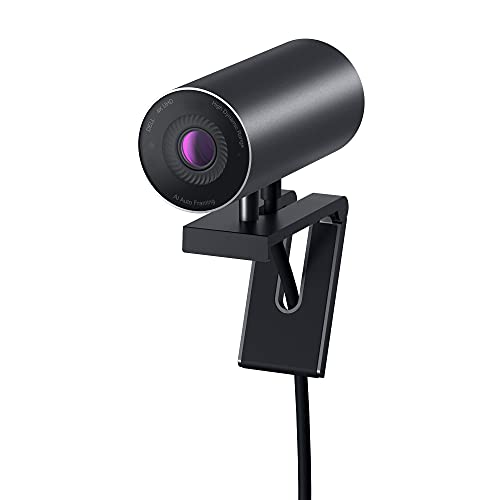
4.4Rated 4.4 out of 5 stars
Dell UltraSharp Webcam WB7022

Review Summary

90%

"Users value its superb optics, accurate colors, and strong microphone array for conference-quality calls, though it's targeted more at professionals than streamers."

BEST OVERALL

Logitech StreamCam

Logitech for Creators

The Logitech StreamCam is a powerhouse designed for content creators and streamers. It boasts full HD 1080p video quality at 60 frames per second for stunning clarity, making your broadcasts stand out. Equipped with intelligent auto-framing and excellent low-light performance, it adapts to various environments effortlessly. The versatile mounting options and easy integration with popular streaming software make it a top choice for serious creators.

4.5Rated 4.5 out of 5 stars
Logitech StreamCam

Review Summary

90%

"The Logitech StreamCam is praised for its high-quality video and seamless integration with streaming platforms, making it a favorite among content creators."

BEST VALUE 4K HIGH-FPS

AVerMedia PW515 4K Ultra HD Webcam

AVerMedia

The AVerMedia PW515 4K Ultra HD Webcam delivers high-resolution capture and reliable high-frame-rate performance at a competitive price, targeting streamers and remote workers who want good optics without the premium of flagship models. It represents strong value-for-money versus higher-cost options like Razer or Dell, while still offering the imaging capabilities needed for smooth, motion-rich USB video workflows.

4.1Rated 4.1 out of 5 stars
AVerMedia PW515 4K Ultra HD Webcam

Review Summary

86%

"Buyers praise its sharp 4K imaging and good value for streamers, but note less mature software, limited enterprise features, and occasional driver hiccups."

How to Choose

Why High Frame Rate Matters: What Research Says

Research in vision science, human factors, and multimedia engineering supports the benefits of higher frame rates for dynamic video. Higher temporal resolution reduces motion blur, improves the viewer's ability to follow fast motion, and can enhance perceived sharpness even when spatial resolution is unchanged. Studies in streaming and human-computer interaction show that smoother video improves viewer engagement and reduces visual fatigue in prolonged viewing. For content creators, higher frame rates also give more flexibility in post-processing, such as smoother slow motion and more accurate motion tracking for background replacement and virtual camera effects.

Reduced motion blur: Vision science shows higher frame rates improve the brain's ability to resolve moving objects, producing clearer motion.

Better viewer engagement: HCI and streaming studies indicate that smoother video maintains attention and perceived quality.

Improved post-production: High FPS footage allows cleaner slow-motion and more accurate software-based stabilizing and tracking.

Lower perceived latency: Higher frame rates, combined with efficient encoding, can make interactions feel more immediate during live streams and video calls.

Applications beyond entertainment: Telemedicine, remote instruction, and sports analysis benefit from higher frame rates for clearer motion detail.

Frequently Asked Questions

Which webcam should I buy for 1080p/60 conferencing?

Choose the Logitech Brio 4K Pro Webcam if you want steady high-frame-rate 1080p/60 for calls; it supports up to 1080p/60fps and averages a 4.6 rating on a $164.99 USDlist price.

Does the Elgato Facecam Pro do 4K at 60fps?

Yes—the Elgato Facecam Pro supports up to 4K/60fps capture, using an uncompressed USB 3.2 connection and Camera Hub manual controls; it’s rated 4.5 and listed at $289.99 USD

How does the Logitech Brio 4K Pro price compare?

The Logitech Brio 4K Pro Webcam lists for $164.99 USDand supports up to 4K/30fps plus 1080p/60fps; compared with Elgato Facecam Pro at $289.99 USDit costs less while still offering 60fps at 1080p.

Is the Razer Kiyo Pro Ultra good for low light gaming?

The Razer Kiyo Pro Ultra is aimed at gamers needing low-light imaging, with support up to 4K/60fps plus HDR and adaptive low-light optics; it averages a 4.3 rating at $399.99 USD

Conclusion

This list highlights seven standout high-FPS USB webcams available to USA buyers in 2026: Logitech Brio 4K Pro Webcam, Elgato Facecam Pro, Razer Kiyo Pro Ultra, Dell UltraSharp Webcam WB7022, Insta360 Link, Logitech StreamCam, and AVerMedia PW515 4K Ultra HD Webcam. Each model targets a different mix of resolution, frame rate, and feature set. For most creators and professionals seeking the best overall balance of resolution, frame rate, compatibility, and software support, the Logitech Brio 4K Pro Webcam remains the top choice. We hope you found the camera that matches your workflow and goals. If you want to refine or expand your search, use the site search to filter by frame rate, resolution, mounting style, or preferred streaming software.

Don't see your product here?

If you're a brand owner wondering why your product isn't listed, we can help you understand our ranking criteria.

Learn why

As an Amazon Associate and affiliate partner, InceptionAi earns from qualifying purchases. This does not influence our rankings. Our product search and market analysis are separate from the selling part.