Top 7 USB Webcams and Digital Camcorders for Gaming in the USA: 2026 Picks

Published on Tuesday, January 27, 2026

USB webcam digital camcorders for gaming deliver the high-quality streaming and recording performance that modern gamers and content creators need. In 2026, these devices combine advanced sensors, high frame rates, HDR and low-light performance, AI-driven auto framing and background tools, and plug-and-play USB convenience to serve livestreamers, esports competitors, and hybrid content creators across the USA. Consumers prefer USB webcams for gaming because they are easy to set up, broadly compatible with PCs and consoles, and often include software ecosystems that simplify color tuning, noise reduction, and virtual camera features. Trends driving demand include continued growth in live streaming on platforms like Twitch and YouTube, rising expectations for video clarity (1080p60 and 4K options), and the need for low-latency interactive experiences. For gamers who also podcast, host interviews, or run multiplayer streams, the right webcam balances image quality, reliable autofocus, performance in varied lighting, and software integration for overlays and green screen effects.

Top Picks Summary

  1. Logitech C922 Pro Stream Webcam
  2. Logitech Brio 4K Ultra HD Webcam
  3. Razer Kiyo Pro Ultra 4K Webcam
  4. Elgato Facecam Premium 1080p60 Webcam
  5. AVerMedia Live Streamer CAM 513 4K
  6. NexiGo N960E 1080p Webcam
  7. Anker PowerConf C200 2K Webcam
BEST BUDGET CLASSIC

Logitech C922 Pro Stream Webcam

Logitech

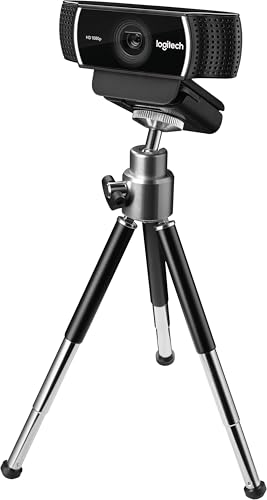
As a longtime favorite among budget-conscious streamers, the Logitech C922 Pro Stream balances reliable 1080p30 / 720p60 performance with an affordable price, making it a practical entry point for gaming capture compared with the 4K competitors in this list. It holds its place by offering stable low-light performance and easy background replacement without the premium cost or bandwidth demands of Brio, Razer or AVerMedia devices.
4.3Rated 4.3 out of 5 stars
Logitech C922 Pro Stream Webcam

Review Summary

90%

"Users praise its reliable 1080p streaming, solid low-light handling and ease of long-term use for gaming and broadcasting, though some note it's showing its age compared to newer models."

Reviews from the web

47 quotes · 10 sources · 2021–2026
  • If you’re looking for a mid-price professional webcam for streaming, the Logitech C922 Pro HD Stream Webcam is the sweet spot among the company’s dozen offerings.

    2021
  • The Logitech C922 additionally flaunts the Logitech stand, which is adaptable. It can be mounted onto most screens or sit in your work area without much of a stretch—balance those with a robust low-light rectification highlight—the capacity to eliminate and supplant video...

    2024
  • The Logitech C922 Pro webcam ticks an awful lot of boxes, thanks to Full HD resolution, autofocus, stereo microphones, a universal monitor mount and included tripod.

    2022
  • The new LEDs were a small but welcome change as well. The soft white is a little less noticeable, especially when any reflection happens but still lets you know where to look in the dark. Check out a comparison between the two.

  • The C920 has long been a staple in the webcam world: dependable, solid 1080p video, decent low-light correction, and a trusted name. But then came C922 Pro Stream built with streamers in mind adding enhancements, smoother motion, and better video tuning.

    · 2025Recent
  • The c920 is just a classic standard all around fine webcam. But it is getting a bit old now and was release date back in 2012... Logitech have the c922 that can do 60fps in 1080p tho. Logitech Brio is a better webcam overall and can do 4k.

    2026Recent
  • Customers are delighted by the C922 Pro Stream's overall performance and excellent video quality, making it great for video conferencing. Many appreciate its ease of use and simple setup.

  • If you are in search of a reliable webcam that elevates your streaming or video conferencing experience, the Logitech C922 Pro Stream Webcam might be the solution you've been looking for.

    2025Recent
  • These specifications make the Logitech C922 Pro Webcam a top choice for users looking for a reliable and high-performance webcam for streaming setups and webcam comparisons.

    2024

Loved

31
  • Easy to set up and use

    Digital Camera World
  • It does have excellent video, streaming at Full 1080p/30fps, as well as auto focus, auto light correction, and two omni-directional microphones. And it has something that’s rare in the Logitech webcam universe: a tripod.

    Tom
  • The C922 has auto focus and light correction, so regardless of how I moved or adjusted the lighting in my environment, I still looked great on camera. The video can be further fine-tuned using digital zoom, as well as pan and tilt.

    Tom
  • It’s one of only five Logitech webcams that will work with XSplit, OBS, and Twitch (as well as YouTube, etc.) – and if you’re looking for a streaming webcam, that’s probably what’s most important.

    Tom
  • There’s one thing that immediately separates the Logitech C922 Pro HD Stream Webcam from all of the other Logitech webcam models. It’s the only one that includes a tripod, and that’s a definite bonus.

    Tom
  • Admittedly, tripods aren’t expensive, but good luck finding one that fits your webcam just right. Since this tripod was made for the webcam, it fits perfectly. (For other options, check out our list of the best iPhone tripods.)

    Tom
  • The Logitech C922 Pro HD Stream webcam performs superbly. Using the Logitech Capture Software, it streams and records at 1080p/30fps and 720p/60fps.

    Tom
  • Fitted with two Omni-directional mouthpieces, the C922 Pro Webcam catches more reasonable sound from numerous points. So your voice comes through, sounding familiar and transparent in your stream.

    The Mighty PC
  • Genuine streamers need the hyperfast outline pace of 60 fps at 720p for extraordinarily smooth video, and that is precisely what the C922 conveys. You’ll be life-communicating with no slack or bending.

    The Mighty PC
  • These days, workstations are more predominant, and webcams aren’t as a great need for some clients any longer. The Logitech C922 figures out how to sparkle with its abilities and its additional highlights like the double mouthpieces for sound system sound, which you won’t...

    The Mighty PC
  • HD autofocus and light revision work to tweak lighting conditions, delivering dangerously short, high-def video in any lighting. So you generally look incredible in your stream.

    The Mighty PC
  • Smooth 60fps at 720p

    redditrecs.com
  • Reliable 1080p video quality

    redditrecs.com
  • Excellent value for money

    redditrecs.com
  • Good for beginner streamers

    redditrecs.com
  • Easy setup and user-friendly

    redditrecs.com
  • The Logitech C922 Pro Stream Webcam boasts high-definition 1080p streaming capabilities at 30 fps, HD 720p streaming at 60 fps, and HD autofocus with light correction for excellent video quality.

    Mini PC Reviewer
  • For professional streamers, the Logitech C922 Pro Stream Webcam offers advanced features like high-quality streaming and extensive customization options. You can enhance your video quality and tailor webcam settings to suit your needs.

    Mini PC Reviewer
  • 60 fps streaming with HD 720p resolution for immersive experiences.

    Mini PC Reviewer
  • Superior performance in low-light environments with advanced light correction.

    Mini PC Reviewer
  • Dual microphones with noise-canceling technology for exceptional audio clarity.

    Mini PC Reviewer
  • Yes, the Logitech C922 Pro Stream Webcam can be your streaming maestro, effortlessly juggling multiple platforms simultaneously. With its dual streaming capabilities and compatibility across various platforms, you can showcase your content seamlessly.

    Mini PC Reviewer
  • With impressive video quality and advanced audio features, the Logitech C922 Pro Stream Webcam offers a reliable solution for content creators and streamers seeking a seamless streaming experience. The pros of the Logitech C922 Pro Stream Webcam include:

    Mini PC Reviewer
  • These features combine to provide users with a high-quality streaming experience and clear audio input.

    Mini PC Reviewer
  • Yes, the Logitech C922 Pro Stream Webcam is compatible with all operating systems. Software updates guarantee smooth performance. System requirements are minimal, offering versatility. For troubleshooting tips, check Logitech's support page.

    Mini PC Reviewer
  • The Logitech C922 Pro Stream Webcam offers you the advantage of streaming at a smooth 60 frames per second, ensuring a high-quality viewing experience. Its low-light performance benefits provide clear and bright images even in dimly lit environments.

    Mini PC Reviewer
  • A notable advantage of the Logitech C922 Pro Webcam is its exceptional video quality that guarantees a professional streaming and conferencing experience. This webcam excels in providing crisp and clear visuals, making it a top choice for various streaming needs.

    Mini PC Reviewer
  • High-definition 1080p resolution for crystal-clear streaming quality.

    Mini PC Reviewer
  • Advanced autofocus ensures sharp visuals without distortion.

    Mini PC Reviewer
  • Innovative background removal feature for professional-looking streams.

    Mini PC Reviewer
  • Built-in stereo audio technology for clear sound transmission.

    Mini PC Reviewer

Criticised

7
  • Can struggle with very loud background noise

    PCMENA
  • While the audio quality is generally good, it may not be on par with a dedicated external microphone, especially in noisy environments. Background noise can sometimes be an issue, so using an external mic might be preferable for professional-quality sound.

    Castos
  • This additionally reaches out to the mount—a similar L-formed lip/joint utilized by the C920, with the mass hanging down onto the back of the screen. The lip on the Logitech C922 pro stream webcam 1080p for HD video streaming is somewhat more than the Stargazers.

    The Mighty PC
  • Not ideal for professional streaming

    redditrecs.com
  • These factors could potentially hinder a seamless setup and efficient utilization of the webcam's features.

    Mini PC Reviewer
  • One drawback of the Logitech C922 Pro Stream Webcam is its software compatibility issues, which may impact the user experience when configuring settings for peak performance. When setting up the Logitech C922 Pro Stream Webcam, you may encounter the following challenges:

    Mini PC Reviewer
  • The Logitech C922 Pro Webcam does not have a built-in privacy cover. This may raise privacy concerns for users seeking enhanced security features. Consider utilizing alternative solutions such as physical webcam covers for added protection against unauthorized access.

    Mini PC Reviewer
BEST 4K PROFESSIONAL

Logitech Brio 4K Ultra HD Webcam

Logitech

The Logitech Brio 4K Ultra HD commands a market-leader position thanks to true 4K capture, HDR support and mature driver/software integration that ensures broad compatibility and low-latency streaming across platforms. For gamers who want the sharpest image and enterprise-grade features, Brio provides proven reliability and professional features at a premium compared with newer 4K challengers like Razer and AVerMedia.

4.4Rated 4.4 out of 5 stars
Logitech Brio 4K Ultra HD Webcam

Review Summary

93%

"Buyers consistently praise the true 4K clarity, excellent HDR and sturdy build quality, while a minority mention the premium price and occasional software/compatibility quirks."

BEST HIGH-END GAMING 4K

Razer Kiyo Pro Ultra 4K Webcam

Razer

The Razer Kiyo Pro Ultra 4K targets gamers who prioritize color accuracy, low-light performance and tight integration with gaming ecosystems; its adaptive optics and gamer-focused features give it a technical edge for live play sessions. Though it typically carries a premium, it often delivers superior motion handling and configuration options compared with the more generic 4K alternatives from Logitech and AVerMedia.

4.3Rated 4.3 out of 5 stars
Razer Kiyo Pro Ultra 4K Webcam

Review Summary

91%

"Owners report outstanding low-light performance, fast autofocus and professional image controls for repeated use, though some users want more polished drivers and software refinement."

Reviews from the web

43 quotes · 13 sources · 2023–2026
  • The Razer Kiyo Pro Ultra is quite simply one of the best webcams you can attach to your computer at the moment, with a 4K video resolution and excellent picture management features. It doesn't quite do everything though, and you'll have to pay quite a bit to own one!

    2023
  • The Kiyo Pro Ultra is one of the best webcams we’ve ever seen... and Synapse 3 is one of the worst software programs we’ve ever seen.

    2023
  • But, whether or not you’re a professional content creator, as long as $299.99 / £299.99 / AU$499.95 is something you can afford, the Razer Kiyo Pro Ultra is the best webcam to get right now.

    2023
  • Final Verdict: If you’re willing to invest in premium quality, the Kiyo Pro Ultra delivers. It’s not without its quirks, but its performance in low light, clarity in all conditions, and advanced features make it a powerful tool for any content creator.

    2025Recent
  • Like most of Razer's PC products, the Kiyo Pro Ultra comes with a slew of software adjustments that can be made using the Razer Synapse app. A lot of people don't like Razer Synapse, but I find it to be fairly straightforward compared to peripheral software from other companies.

    · 2023
  • We’ve tested plenty of 4K webcams and the Kiyo Pro Ultra’s picture quality plainly stands out, particularly against the maximum 1080p resolution of the Kiyo Pro. I look incredibly sharp in well-lit test captures; individual hairs on my head and beard appear crisp and detailed.

    · 2023
  • All of the Razer Kiyo Pro Ultra’s controls are found within the Synapse Streaming tab at the very top: All of the options are generally well organized under Camera, though you’ll find the resolution and frame rate inexplicably tucked inside the Processing tab.

  • The native 78-degree horizontal field of view frames a single person nicely at typical desk distances (24-36 inches from camera). Wide enough to capture upper-body gestures and some desk context, narrow enough to avoid the “fisheye” feel of ultra-wide models.

  • In the time I've been testing this webcam, I've taken numerous camera-on meetings on Discord, Microsoft Teams, and Zoom. The image quality in every application is crystal clear and almost always elicits comments from my fellow meeting attendees.

    · 2024
  • The Razer Kiyo Pro Ultra does not have built-in image stabilization features. However, it excels in low light performance and autofocus capabilities, ensuring exceptional image quality and video streaming performance, making it a top choice for content creators.

    2024
  • Razer Kiyo Ultra Pro if you wanna spend the $$$ Insta360 Link 2 is probably the best webcam for the money and full of software features.

    2026Recent
  • Sometimes it's tough to tell that a webcam's privacy shutter is closed if it has one at all. Not so with this Razer. When closed, the shutter's light gray teeth stand out clearly against the black webcam. I could spot whether the shutter was open or closed from across the room.

    · 2023

Loved

20
  • And, while it comes with an unattached camera cover, something the Elgato Facecam Pro doesn’t even bother with, it throws in a built-in privacy shutter for good measure – in case you do lose that cover.

    TechRadar
  • Wide dynamic range plus HDR

    TechRadar
  • Despite its intimidating size, the Razer Kiyo Pro Ultra is very easy to set up, being plug and play. It has a 1.5-meter braided cable that may be pretty thick but is manageable.

    TechRadar
  • Great low-light performance and noise handling

    TechRadar
  • Easily customisable on Windows

    T3
  • In the box there's a good quality, braided USB-C-to-USB-A cable, a lens cover for the camera, and should you want to make absolutely sure no one is spying on you over the internet there's also has a built-in privacy shutter that you can put in place by twisting the front of...

    T3
  • Top-end 4K video resolution

    T3
  • The Kiyo Pro Ultra looks great with its default, out-of-the-box settings. It does an excellent job with auto-exposure and auto-color balance, even better than the Insta360 Link.

    Tom
  • Great auto-exposure and white balance

    Tom
  • The monitor mount screws into the webcam’s universal tripod mounting point, and features rubberized, non-slip material for extra stability and grip when it’s sitting atop your monitor.

    Tom
  • The Kiyo Pro Ultra comes with a soft, rubbery physical lens cap, as well as an internal privacy shutter that’s cleverly designed to mimic an iris. Twisting the webcam’s outer ring to the left closes the privacy shutter, while twisting it to the right opens it.

    Tom
  • For those of you keeping track, this webcam has not one but two physically-operated privacy controls, while other impressive 4K webcams such as the Insta360 Link and the Elgato Facecam Pro have none. Also — closing the privacy shutter does not turn off the camera.

    Tom
  • 4K options, HDR too

    PCWorld
  • Lens cap as well as a privacy shield

    PCWorld
  • Ultra-high image quality with variable FPS options

    Pocket-lint
  • Large 2.9 μM Pixel Size and F/1.7 Aperture Lens for superior image quality.

    Mini PC Reviewer
  • Ai-Powered Face Tracking and Background Blur for professional video communication.

    Mini PC Reviewer
  • HDR technology for vibrant visuals and true-to-life colors.

    Mini PC Reviewer
  • Compatible with Windows 8, OBS, and Xsplit for versatile use.

    Mini PC Reviewer
  • Easy setup and user-friendly

    Reddit

Criticised

10
  • It is fairly heavy at 348g without the lens cover, which means it’ll be too big for mounting on any laptop screen, even the 18-inch Blade that Razer is rolling out.

    TechRadar
  • Not the right size for laptops

    TechRadar
  • 4K at 30fps only

    TechRadar
  • Field of view could be better

    T3
  • No full macOS software support

    T3
  • It's an expensive upgrade

    T3
  • Razer Synapse app is the worst

    Tom
  • The Kiyo Pro Ultra comes with an L-shaped, clamp-style monitor mount (already attached), a lens cover, and a 5-foot, braided USB-C to USB-C cable.

    Tom
  • Limited purchase options; just Razer.com for now

    PCWorld
  • Not compatible with nintendo switch 2

    Reddit

Buyer voices

1
  • A normal person's mini review of the Kiyo Pro UltraReview (self.razer)

    reddit
BEST LOW-LATENCY 1080P

Elgato Facecam Premium 1080p60 Webcam

Elgato

The Elgato Facecam Premium focuses on studio-grade 1080p60 capture with a large sensor and high-bitrate encoding, making it a best-in-class choice for streamers who favor smooth frame rates over raw 4K resolution. It undercuts many 4K models on cost and bandwidth while outperforming other 1080p webcams on image tuning, making it ideal for gamers who want buttery 60 FPS streams without moving to 4K.

4.6Rated 4.6 out of 5 stars
Elgato Facecam Premium 1080p60 Webcam

Review Summary

94%

"Long-term users love its clean, consistent 1080p60 image, pro-grade lens and reliable performance for streaming, with praise for Elgato's software while noting it lacks native 4K."

BEST 4K STREAMER VALUE

AVerMedia Live Streamer CAM 513 4K

AVerMedia

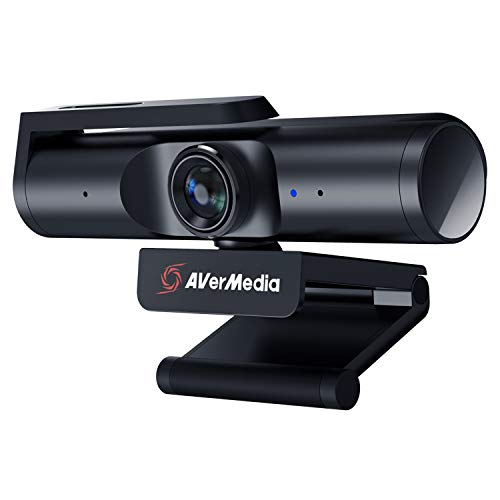
AVerMedia's Live Streamer CAM 513 delivers true 4K capture, dependable autofocus and streamer-oriented software, positioning it as a cost-effective challenger to higher-priced 4K options like the Brio and Razer. Often priced more competitively, it offers comparable image quality and useful streaming features for gamers who want 4K capability without paying top-tier premiums.
4.2Rated 4.2 out of 5 stars
AVerMedia Live Streamer CAM 513 4K

Review Summary

88%

"Users appreciate the solid 4K image, wide-angle view and plug-and-play convenience for repeated streaming sessions, although some report occasional autofocus jitter and mixed software experiences."

BEST ENTRY-LEVEL PLUG-AND-PLAY

NexiGo N960E 1080p Webcam

NexiGo

The NexiGo N960E is a budget-friendly 1080p webcam that provides solid image quality, AI background features and an accessible price point, making it attractive for new streamers and secondary camera setups. It cannot match the low-light sensitivity or advanced sensors of the premium 4K and high-end 1080p devices on this list, but its financial value and feature set make it a practical starter option for gaming.

4.1Rated 4.1 out of 5 stars
NexiGo N960E 1080p Webcam

Review Summary

86%

"Reviewers find it a dependable budget webcam with decent autofocus and clear video for regular gaming streams, while noting its plastic build and limited advanced controls."

BEST MIDRANGE 2K FOR STREAMERS

Anker PowerConf C200 2K Webcam

Anker

Anker's PowerConf C200 occupies a midrange niche with 2K (1440p) capture, smart framing and AI enhancements, delivering more detail than standard 1080p webcams at a lower cost and bandwidth requirement than 4K units. Its blend of value and conferencing-style software makes it a solid choice for gamers who want sharper video than 1080p without committing to the price or system demands of true 4K cameras.

4.2Rated 4.2 out of 5 stars
Anker PowerConf C200 2K Webcam

Review Summary

87%

"Customers like its 2K resolution, smart framing and versatile mounting options for ongoing streaming and meetings, though some advanced users desire improved low-light output."

How to Choose

Research-Backed Benefits of High-Quality Webcams for Gaming and Streaming

A body of research in media psychology, human-computer interaction, and streaming analytics shows that improved video quality, higher frame rates, and lower latency contribute to viewer engagement, perceived presence, and interaction effectiveness. While specific outcomes depend on content type and audience, the general findings support investing in better capture hardware and software when streaming gameplay or producing live content.

Higher resolution and better dynamic range increase perceived presence and professionalism, which correlates with longer viewer watch time in creator analytics.

Higher frame rates reduce motion blur during fast gameplay, making action clearer for viewers and improving perceived production quality.

Lower end-to-end latency supports real-time chat interaction and viewer-driven events, improving audience participation and satisfaction.

AI features like auto framing and background replacement reduce manual production overhead and help creators stay on camera without constant adjustments.

Improved low-light sensitivity and noise reduction produce clearer images in typical gaming room setups without expensive lighting.

Plug-and-play USB connectivity and reliable drivers increase accessibility for new streamers and reduce setup friction.

Frequently Asked Questions

Which webcam should I buy for gaming streaming 2026?

Choose the Logitech C922 Pro Stream Webcam for a practical entry point: it delivers 1080p/60 optimized streaming, has autofocus plus low-light correction, and sells for $89.78 USDwith a 4.3 average rating.

What exact resolution and frame modes does Brio 4K offer?

The Logitech Brio 4K Ultra HD Webcam supports native 4K capture, plus a 1080p/60 option for ultra-clear streaming and recording, with an average rating of 4.4.

Is the Razer Kiyo Pro Ultra 4K worth its price?

At $408.29, the Razer Kiyo Pro Ultra 4K gives 4K capture with high-frame 1080p/60 modes, plus an adaptive light sensor and advanced HDR; it averages 4.3 stars.

Does Logitech C922 Pro Stream Webcam include background replacement?

Yes—the Logitech C922 Pro Stream Webcam includes background replacement support and focuses on 1080p/60 streaming, with ~78° field of view and a tripod-ready clip; rating is 4.3.

Conclusion

In the USA market for 2026, USB webcams and digital camcorders give gamers and creators a clear path to better streams and recordings. The models covered here include the Logitech C922 Pro Stream Webcam, Logitech Brio 4K Ultra HD Webcam, Razer Kiyo Pro Ultra 4K Webcam, Elgato Facecam Premium 1080p60 Webcam, AVerMedia Live Streamer CAM 513 4K, NexiGo N960E 1080p Webcam, and Anker PowerConf C200 2K Webcam. Each has strengths: the C922 Pro Stream remains a reliable entry-level favorite, the Elgato Facecam is tuned for 1080p60 creators, AVerMedia and Razer offer strong 4K options for high-detail streams, and NexiGo and Anker provide excellent value and conferencing versatility. For most serious gamers who want the best blend of resolution, color accuracy, and platform support, the Logitech Brio 4K Ultra HD Webcam stands out as the top choice on this page. I hope you found what you were looking for; you can refine or expand your search using the site search to focus on price, resolution, frame rate, or additional features.

Don't see your product here?

If you're a brand owner wondering why your product isn't listed, we can help you understand our ranking criteria.

Learn why

As an Amazon Associate and affiliate partner, InceptionAi earns from qualifying purchases. This does not influence our rankings. Our product search and market analysis are separate from the selling part.