Top 8 USB Webcams and Digital Camcorders for Education in the USA — 2026

Published on Tuesday, January 27, 2026

USB webcam digital camcorders for education facilitate virtual learning experiences with clear video and audio. Designed for teachers, students, and classroom tech coordinators, these devices prioritize reliable plug-and-play connectivity, crisp resolution, low-light performance, and integrated or dual-microphone arrays for clear voice capture. In the USA market for 2026, buyers prefer solutions that balance image quality (from 1080p to 4K), ease of use, cross-platform compatibility with Zoom, Teams, Google Meet and LMS platforms, privacy controls, and reasonably priced options for district procurement or at-home learning. Newer features such as AI-powered auto-framing, background removal, USB-C power, and hardware privacy shutters are increasingly important to educators who want consistent, distraction-free remote and hybrid instruction.

Top Picks Summary

  1. Logitech C920x HD Pro Webcam
  2. Logitech C270 HD Webcam
  3. Logitech Brio 4K Ultra HD Webcam
  4. Microsoft Modern Webcam
  5. Anker PowerConf C200 2K Webcam
  6. NexiGo N60 1080p Webcam
  7. Razer Kiyo Pro Ultra 4K Webcam
  8. Elgato Facecam MK.2
BEST ALL‑ROUND CLASSROOM WEBCAM

Logitech C920x HD Pro Webcam

Logitech

The Logitech C920x HD Pro Webcam remains a market leader for education thanks to its reliable 1080p autofocus, balanced exposure and wide software support that make distance learning and lecture capture consistent across platforms. It holds an edge over cheaper models like the C270 by delivering sharper, more natural video for teacher-facing lessons while offering a far more affordable alternative to 4K options such as the Brio for schools needing dependable quality on a budget.

4.6Rated 4.6 out of 5 stars
Logitech C920x HD Pro Webcam

Review Summary

94%

"Reliable 1080p webcam with consistent image quality, dependable autofocus, and plug-and-play simplicity; users praise its long-term stability for daily classroom use."

Reviews from the web

38 quotes · 10 sources · 2024–2026
  • Default webcam for remote workers for nearly a decade—for good reason. Crisp 1080p and dual-mic audio, but lacks 4K and privacy shutter.

  • The Logitech C920x HD Pro Webcam is an outstanding choice for anyone looking to enhance their video calling and streaming experience. With Full HD video, clear audio, and automatic light correction, it offers everything you need for professional-grade video communication.

    · 2025Recent
  • Whether you're a professional looking to elevate your video conferencing experience or a home user seeking a high-quality webcam for online meetings, the Logitech C920x HD Pro Webcam is an excellent choice.

  • The Logitech C920x HD Pro is a Full HD 1080p webcam with automatic light correction, stereo dual microphones, and broad platform compatibility including Microsoft Teams, Google Meet, Zoom, and Nintendo Switch 2's new GameChat mode.

  • The Logitech C920x (currently around $70) is essentially the same webcam Logitech released in 2012 as the C920, just with slightly updated packaging and a 3-month XSplit software license nobody uses. This is important to understand upfront: you're buying a decade-old design.

    2026Recent
  • Navigating the advanced capture software with this webcam feels refreshingly straightforward. We’ve found that the interface allows us to efficiently create and share content, making it well-suited for both casual users and those who regularly engage in video production.

    · 2024
  • These specifications highlight the webcam's ability to deliver high-quality video and audio, along with advanced features like autofocus and lighting adjustment, making it a top choice for various applications.

    2024
  • The Logitech C920 (you might also see variants like the C920S with a privacy shutter, or C920e/C920x) is a Full HD 1080p webcam that connects to your computer via USB. It's known for its solid image quality for its price, reliable autofocus, and sturdy build.

    ·
  • The autofocus feature of the C920x is an excellent addition, particularly for those who need to move around during a video call or streaming session. The autofocus generally works well, keeping the image sharp even when you’re not perfectly centered.

    · 2025Recent

Loved

25
  • The HD light correction system works as advertised. In dim office lighting—a common scenario for anyone whose desk sits away from a window—the camera adjusts exposure quickly without blooming highlights or crushing shadow detail into black mush.

    TechTub
  • The physical construction feels solid. The 5.7oz weight and compact 3.7" width are balanced intentionally—the camera feels substantial without being cumbersome, and the dimensions make it easy to perch on top of any monitor without needing a separate stand or requiring a...

    TechTub
  • Plug-and-play USB connectivity with no drivers required is a strength that deserves emphasis. Windows, Mac, Linux—it works out of the box.

    TechTub
  • Logitech's brand reputation and legendary longevity also matter in the math. This camera will still work reliably in five years. That durability has value, even if the spec sheet doesn't shout it.

    TechTub
  • Good video quality with proper lighting

    Reddit
  • Excellent durability and longevity

    Reddit
  • Great value for money

    Reddit
  • Reliable performance for streaming

    Reddit
  • Affordable price for premium features and performance.

    Mini PC Reviewer
  • The Logitech C920x HD Pro Webcam features a built-in privacy indicator, enhancing security by providing a visible signal when the webcam is in use. This feature guarantees user privacy and control over when the camera is active.

    Mini PC Reviewer
  • Like a skilled acrobat on a high wire, the Logitech C920x HD Pro Webcam guarantees elegantly on a tripod, offering users unparalleled flexibility in positioning. Tripod compatibility guarantees ideal angles for seamless video calls and content creation.

    Mini PC Reviewer
  • The Logitech Capture software is compatible with Windows 10 and macOS 10.14 or later. It offers robust features like recording, streaming, and customization.

    Mini PC Reviewer
  • Begin a sonic journey with Logitech C920x HD Pro Webcam's dual microphones. Utilizing advanced audio quality, these mics can operate simultaneously for ideal noise cancellation. Compatible across various platforms, they offer a seamless and professional audio experience.

    Mini PC Reviewer
  • Full HD 1080p resolution for crisp video quality.

    Mini PC Reviewer
  • Stereo audio with dual mics for clear sound.

    Mini PC Reviewer
  • Versatile compatibility with various operating systems.

    Mini PC Reviewer
  • Advanced features like autofocus and low-light correction.

    Mini PC Reviewer
  • Two built-in microphones capture audio from both sides, creating balanced, natural-sounding voice reproduction. While serious streamers may want a dedicated USB mic, the C920x's audio quality is more than sufficient for video calls and casual content.

    Royal Strawberry
  • A notable addition is full compatibility with Nintendo Switch 2's new GameChat feature, allowing face-to-face communication during gaming sessions.

    Royal Strawberry
  • Best For : Remote workers, content creators, and gamers needing reliable 1080p video calls

    Royal Strawberry
  • The C920x features Logitech's proven design language—a compact cylindrical body with a matte black finish that blends into any setup. The build quality is solid without being heavy, weighing just 162 grams.

    Royal Strawberry
  • The universal clip mount is where this webcam shines. It attaches securely to monitors of any thickness (including ultrathin displays), laptop screens, and standard tripods via the 1/4-inch thread. The L-shaped base provides stability on flat surfaces too.

    Royal Strawberry
  • The C920x captures video at 1920x1080 resolution at 30 frames per second—the standard for professional video conferencing. You get crisp details and smooth motion that makes you look polished on calls.

    Royal Strawberry
  • Logitech's automatic light correction technology analyzes your environment and adjusts exposure in real-time. Whether you're in a dim home office or sitting in front of a bright window, the C920x compensates to keep your face properly lit.

    Royal Strawberry
  • The C920x works plug-and-play with virtually every major platform: Microsoft Teams, Google Meet, Zoom, Skype, Discord, OBS Studio, Streamlabs, and more. It's also compatible with Windows 11, macOS, and Chrome OS without additional drivers.

    Royal Strawberry

Criticised

4
  • The one caveat: 1080p at 30fps shows its age when you gesture or move quickly. Hand motion looks slightly choppy compared to the smooth 60fps video that budget competitors now offer.

    TechTub
  • However, the camera cannot salvage truly dark rooms. If you're video conferencing in a space with minimal ambient light and no supplemental lighting, the image will look dim and grainy.

    TechTub
  • Image stabilization is absent entirely, which means any desk movement, monitor vibration, or camera jiggling is transmitted directly to your video feed. If your desk is rock-solid and your setup is stable, you won't notice.

    TechTub
  • The Logitech C920x HD Pro Webcam does not offer digital zoom capabilities during video calls. While it excels in video call clarity and overall performance, the device lacks digital zoom functionality for closer image magnification during calls.

    Mini PC Reviewer
BEST BUDGET CLASSROOM WEBCAM

Logitech C270 HD Webcam

Logitech

The Logitech C270 HD Webcam is the budget workhorse for large-scale classroom deployments, offering basic 720p video, a simple setup and a very low price that keeps per-student costs down. Compared with higher-resolution devices in this list it sacrifices detail and low-light performance, but its financial advantage and plug-and-play reliability make it the pragmatic choice for kiosks, computer labs and mass rollouts in education.

4Rated 4 out of 5 stars
Logitech C270 HD Webcam

Review Summary

86%

"Affordable 720p webcam that provides acceptable picture and clear audio for basic remote teaching; reviewers note limited low-light performance but commend its simplicity and value."

BEST HIGH‑RESOLUTION PRESENTATION WEBCAM

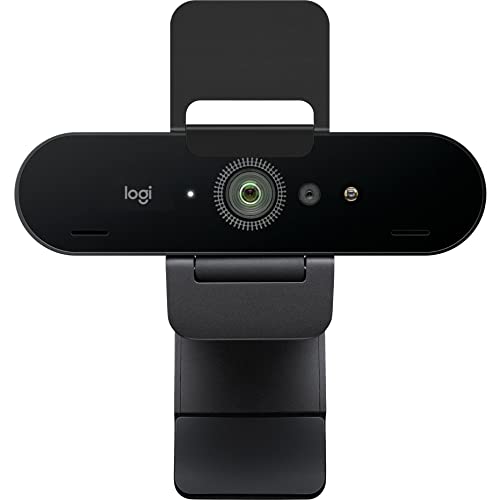
Logitech Brio 4K Ultra HD Webcam

Logitech

The Logitech Brio 4K Ultra HD Webcam is the premium choice for institutions that need high-fidelity lecture capture, livestreamed demonstrations and future-proofed recordings with HDR and 4K detail. Although it commands a higher price than the C920x or midrange cameras, its superior dynamic range and optional Windows Hello support deliver technical benefits for advanced hybrid classroom setups and recorded content where clarity and cropping flexibility matter most.
4.5Rated 4.5 out of 5 stars
Logitech Brio 4K Ultra HD Webcam

Review Summary

92%

"High-end 4K webcam delivering excellent detail, HDR support, and strong low-light handling; buyers highlight outstanding image quality while noting a premium price tag."

BEST MICROSOFT‑OPTIMIZED CLASSROOM WEBCAM

Microsoft Modern Webcam

Microsoft

The Microsoft Modern Webcam is designed for seamless integration with Microsoft Teams and the wider Microsoft 365 ecosystem, delivering dependable 1080p streaming and business-class features optimized for hybrid classrooms. It stands out for institutions already standardized on Microsoft software by reducing configuration overhead and support costs, though it is less feature-dense on image customization compared with enthusiast cameras like the Razer or Elgato models.

4.2Rated 4.2 out of 5 stars
Microsoft Modern Webcam

Review Summary

89%

"Solid 1080p webcam built for meeting rooms and classrooms with dependable auto-exposure and color; users appreciate Microsoft ecosystem integration but mention it costs more than comparable models."

BEST VALUE 2K CLASSROOM WEBCAM

Anker PowerConf C200 2K Webcam

Anker

The Anker PowerConf C200 2K Webcam offers a compelling midrange option for education with 2K resolution and AI-driven auto-framing at a price point that undercuts many premium 4K models. It represents strong technical value for lecture streaming and small-group instruction by balancing resolution, smart features and affordability—an attractive step up from basic 720p webcams without the full premium of 4K devices.

4.3Rated 4.3 out of 5 stars
Anker PowerConf C200 2K Webcam

Review Summary

90%

"2K webcam with a wide-angle lens and smart framing that works well for small classrooms and multi-person shots; reviewers like the sharpness and features but occasionally report software quirks."

BEST LOW‑COST 1080P TEACHING WEBCAM

NexiGo N60 1080p Webcam

NexiGo

The NexiGo N60 1080p Webcam is a cost-effective 1080p solution tailored for classrooms that need reasonable image quality, a built-in privacy shutter and simple deployment. It compares favorably on price to mainstream Logitech and Microsoft offerings while delivering sufficient video clarity for everyday remote teaching, though it generally lags behind higher-end sensors in low-light classrooms and advanced color fidelity.

4.1Rated 4.1 out of 5 stars
NexiGo N60 1080p Webcam

Review Summary

88%

"Good-value 1080p webcam offering solid low-light performance and simple plug-and-play operation; long-term users praise the durable build though advanced software features are basic."

BEST ADVANCED IMAGING FOR EDUCATIONAL CONTENT

Razer Kiyo Pro Ultra 4K Webcam

Razer

The Razer Kiyo Pro Ultra 4K Webcam targets pro-level content creators and advanced educators who demand top-tier low-light performance, ultra-high resolution and extensive image controls for polished recordings and streams. While pricier than the midrange and budget models, its technical prowess makes it a standout for recorded lectures, lab demonstrations and media-rich lessons where image quality and real-time tuning justify the added cost.

4.4Rated 4.4 out of 5 stars
Razer Kiyo Pro Ultra 4K Webcam

Review Summary

91%

"High-performance 4K-capable streaming webcam with excellent low-light sensors, wide color gamut, and multiple capture modes; reviewers praise the image quality while noting the higher cost and occasional driver updates."

BEST CREATOR‑GRADE CLASSROOM WEBCAM

Elgato Facecam MK.2

Elgato

The Elgato Facecam MK.2 focuses on studio-grade 1080p60 capture with a large sensor and advanced software controls, making it an excellent choice for educators creating polished video lessons and flipped-classroom content. It bridges the gap between consumer webcams and professional cameras by offering superior image tuning and integration with streaming tools; compared with 4K units it is more affordable while delivering more controllable image quality than many stock webcams.

4.5Rated 4.5 out of 5 stars
Elgato Facecam MK.2

Review Summary

92%

"Creator-focused webcam that delivers crisp 1080p60 footage from a large sensor with professional tuning tools; users like the reliable image and customization but miss an onboard microphone."

How to Choose

Why better video and audio matter for learning

Research into remote and hybrid learning shows that clear video and reliable audio improve student engagement, teacher presence, and comprehension. Visual cues like facial expressions and gestures help with social and emotional learning, while good audio reduces listening effort and cognitive load, making lessons easier to follow. Studies from education technology reviews and communication research consistently recommend investing in basic camera and microphone quality to support inclusive and effective digital instruction.

Improved attention and engagement: Clear video helps students maintain focus and follow nonverbal cues that reinforce instruction.

Reduced cognitive load: High-quality audio reduces effort required to understand spoken content, especially for students with language or hearing challenges.

Stronger instructor presence: Better image quality and stable framing make instructors feel more present, which supports motivation and participation.

Accessibility benefits: Crisp video and audio pair well with captioning and screen-reader workflows, supporting diverse learners.

Technology adoption: Low-friction, plug-and-play webcams increase adoption in classrooms and at home, supporting consistent instructional delivery.

Frequently Asked Questions

Which webcam is best for classroom lecture capture?

Choose the Logitech C920x HD Pro Webcam: it offers 1080p/30fps with reliable autofocus plus dual stereo microphones, which fits distance learning and lecture capture across platforms with an average rating of 4.6.

Does the Logitech C920x include microphones and autofocus?

Yes—the Logitech C920x HD Pro Webcam includes 1080p/30fps reliable autofocus and dual stereo microphones for natural voice capture, and it also has automatic low-light correction with a wide field of view for group capture.

Is the Logitech C270 worth it under $25?

Yes: the Logitech C270 HD Webcam costs $18.89 USDand provides 720p/30fps video plus a built-in noise-reducing microphone and simple clip-and-go mounting, making it a budget option for basic one-on-one remote instruction.

What features does the Brio 4K offer for classrooms?

The Logitech Brio 4K Ultra HD Webcam includes true 4K capture with HDR, adjustable field of view, and infrared support for Windows Hello; it’s rated 4.5 and costs $169.99 USD

Conclusion

Whether you need a high-end capture solution or a reliable budget camera, the U.S. education market in 2026 offers strong choices. The Logitech C920x HD Pro Webcam and Logitech C270 HD Webcam cover dependable 1080p and entry-level needs, while the Logitech Brio 4K Ultra HD Webcam stands out as the best overall choice for schools and educators who want future-proof resolution and advanced features. The Microsoft Modern Webcam and Anker PowerConf C200 2K Webcam are solid options for clean design and conferencing-focused performance. For value-minded or alternative picks, the NexiGo N60 1080p Webcam and Elgato Facecam MK.2. deliver dependable imaging for lessons and content creation, and the Razer Kiyo Pro Ultra 4K Webcam targets educators who also create high-end video or stream. I hope you found what you were looking for; use the search to refine by price, resolution, mounting style, or platform compatibility to expand or narrow your options.

Don't see your product here?

If you're a brand owner wondering why your product isn't listed, we can help you understand our ranking criteria.

Learn why

As an Amazon Associate and affiliate partner, InceptionAi earns from qualifying purchases. This does not influence our rankings. Our product search and market analysis are separate from the selling part.